Choose how to use BoatKit
BoatKit can grow with the way you use your boat. You can begin with charts and routes on a mobile device, connect that device to your vessel, or install a dedicated BoatKit device for continuous service.
These are three levels of adoption, not separate product editions. Start with the level that meets your needs now.
Compare the three levels
| Level | BoatKit runs on | Vessel data | Best fit | What you maintain |
|---|---|---|---|---|
| Research / Explore | Your iOS, iPadOS, or Android device | Device GPS, with optional basic NMEA 0183 data over a TCP or UDP Wi-Fi gateway | Chart research, route finding, and basic route following | The BoatKit app and downloaded map data |
| App-hosted vessel | A dedicated or shared iOS, iPadOS, or Android device | NMEA 2000 and supported marine networks through gateways or adapters | Most BoatKit vessel features without installing a separate computer | A powered device, the app, a hub or gateways, and operating-system updates |
| BoatKit device | Dedicated Raspberry Pi-based hardware | NMEA 2000 and supported marine networks through built-in ports, HATs, or adapters | A permanent vessel installation and continuous service | The physical installation; BoatKit software updates automatically |
Level 1: Research / Explore
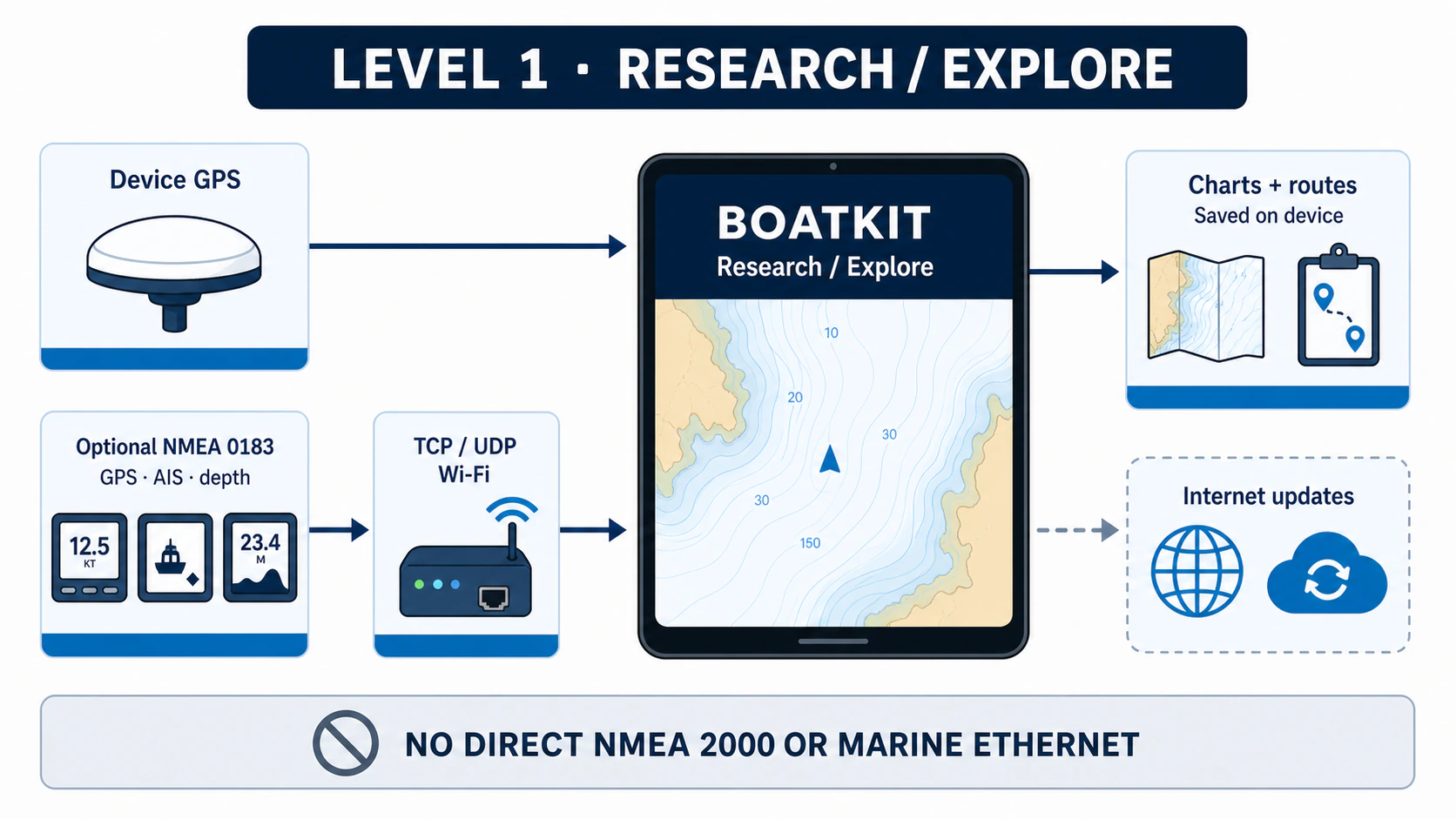
Choose Research / Explore in the BoatKit app to research charts, calculate routes, and follow a route using the mobile device's GPS. BoatKit runs in a private workspace on that device and does not directly connect to the vessel's NMEA 2000 or chartplotter networks.
Optionally, BoatKit can receive basic GPS, AIS, and depth data from an NMEA 0183 gateway reachable over Wi-Fi using TCP or UDP. This supplements the local Research / Explore workspace; it does not turn the device into an app-hosted vessel or publish the vessel for remote monitoring.
Research / Explore is currently available on iOS, iPadOS, and Android. Keep the app in the foreground while using GPS and following a route. The macOS and Windows apps currently connect to existing vessels; they do not run a local Research / Explore workspace.
This is the right starting point when you want to evaluate BoatKit's charts and routes before buying vessel-network hardware.
Level 2: App-hosted vessel
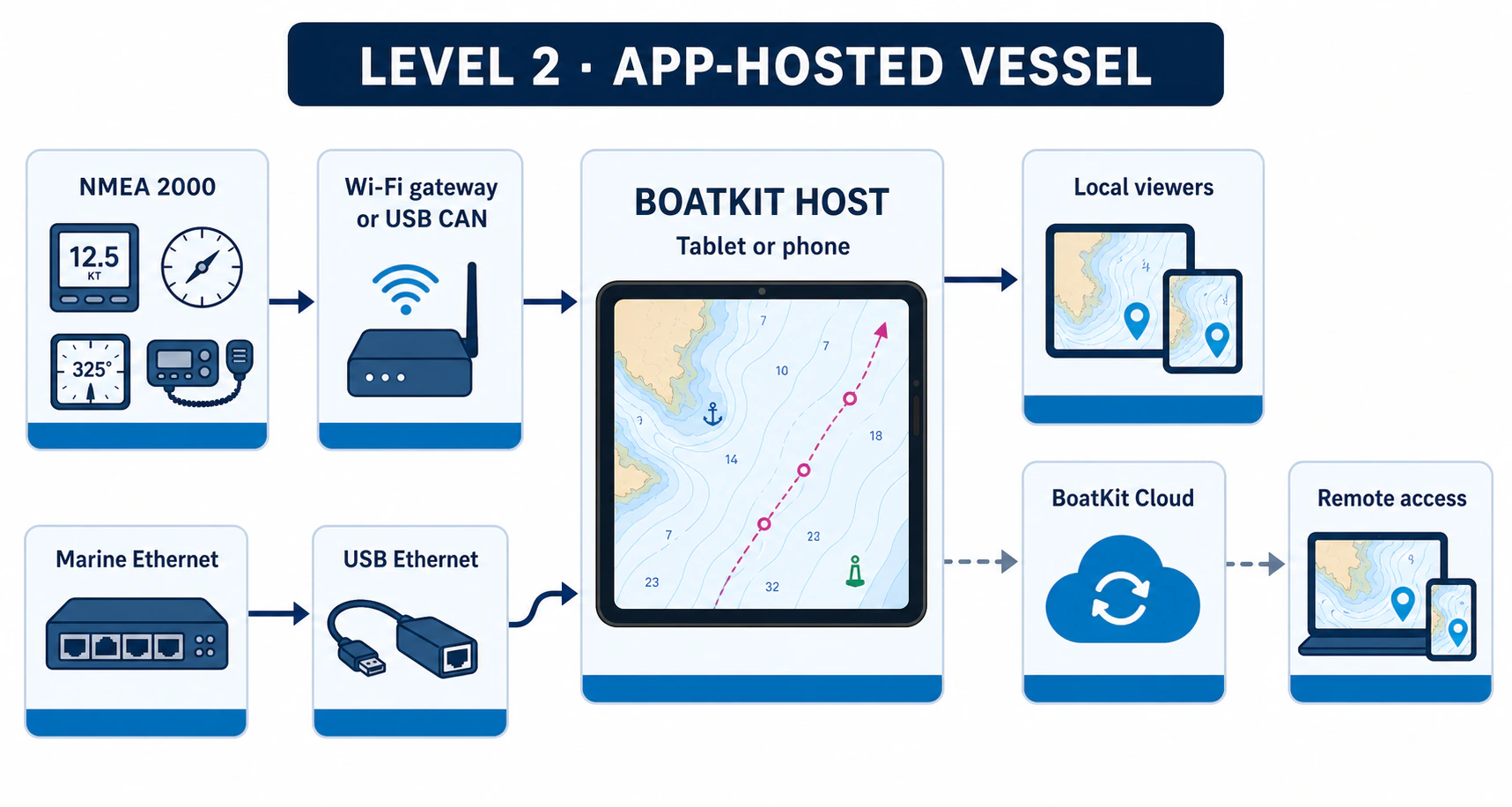
Choose Host a Vessel to make an iOS, iPadOS, or Android device the BoatKit host for your boat. A compatible NMEA 2000 network gateway or platform-specific USB CAN adapter brings instrument and sensor data into BoatKit. A separate USB Ethernet adapter can connect supported chartplotter, radar, or sonar networks.
The app-hosted vessel can provide vessel history, local viewing, and remote access, monitoring, and supported control through BoatKit Cloud. Available features still depend on the connected equipment and what the mobile operating system allows.
Plan to keep the host device powered, connected, updated, and in vessel mode. A powered USB hub and one or more adapters may remain attached. Low-power modes, heat, a disconnected cable, or force quitting or stopping BoatKit can interrupt monitoring. Treat it as a monitored operator station rather than an unattended appliance.
Continue with Hardware for an app-hosted vessel before buying gateways, hubs, or USB adapters.
Level 3: BoatKit device
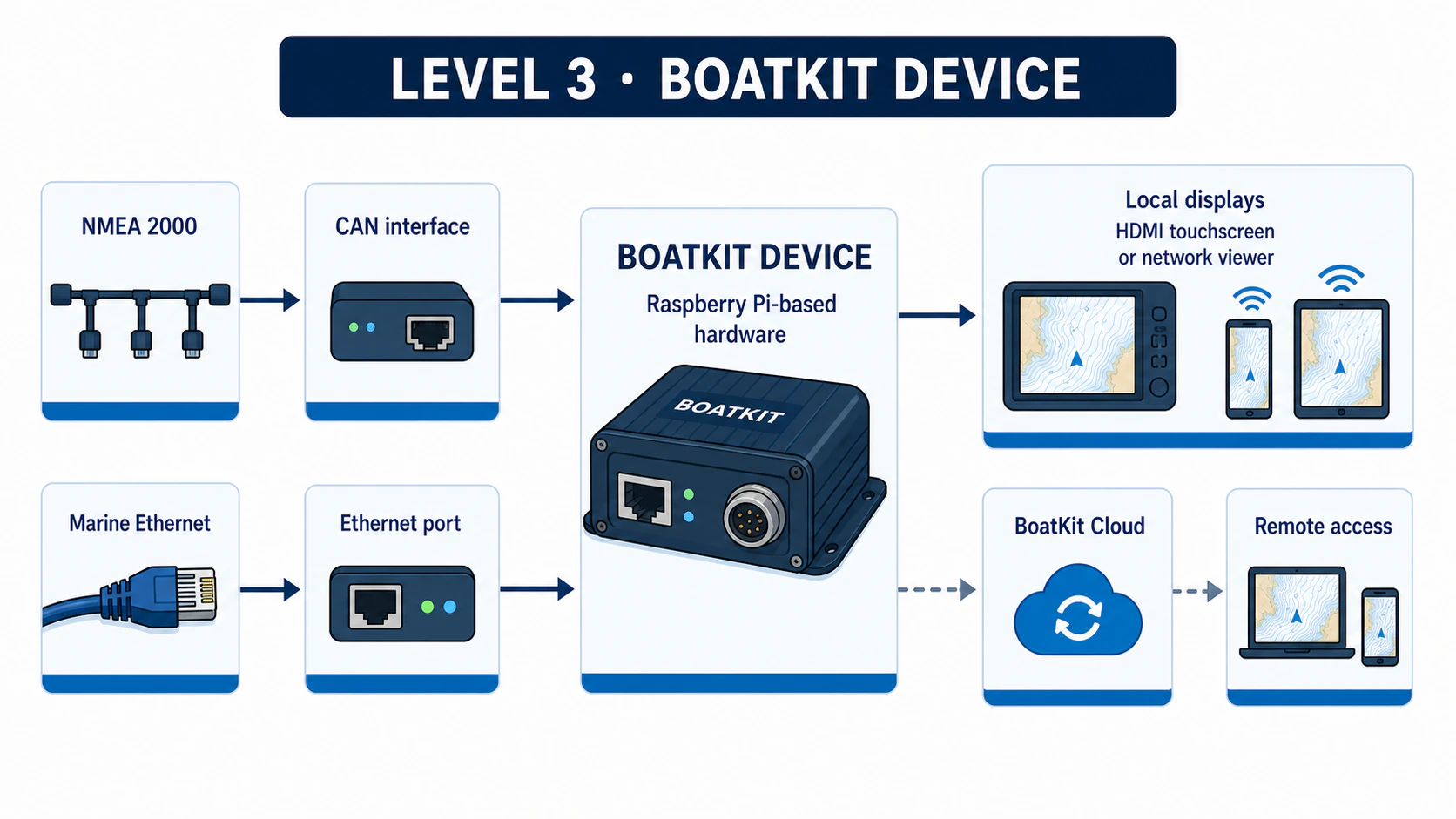
A BoatKit device is dedicated Raspberry Pi-based vessel hardware. You can build one with a Raspberry Pi 4, Raspberry Pi 5, or Raspberry Pi Zero 2 W. It can use a proven CAN HAT or USB CAN adapter for NMEA 2000 and onboard or USB Ethernet for supported chartplotter networks.
A full-size Raspberry Pi can also drive an attached HDMI touchscreen as its local display. Phones, tablets, and computers can remain separate network viewers.
This level is designed to remain installed, powered, and connected as the vessel's set-and-forget BoatKit host. BoatKit updates automatically when an internet connection is available. Local operation remains available without BoatKit Cloud.
The Pi Zero 2 W is a compact, headless option. Its 512 MB of memory is reserved for BoatKit's core services, so it does not run an onboard browser. Open it from another phone, tablet, or computer.
Continue with Build a BoatKit device to compare boards, proven CAN options, and the early-access image process.
Local first, cloud optional
An app-hosted vessel or BoatKit device serves the vessel locally. Local displays on the boat can keep using a reachable BoatKit host when the internet is down.
BoatKit Cloud adds remote access, sharing, and notifications. Those services require an internet connection at the vessel and at the remote viewer.
Continue from here
- For live help choosing or setting up a system, join the BoatKit Discord community.
- To learn the interface, continue with Using BoatKit.
- To connect marine equipment, see Peripherals and integrations.
- If something is not connecting, start with Troubleshooting.
BoatKit and its route suggestions are aids. They do not replace official charts, certified navigation equipment, required watchkeeping, seamanship, or equipment manufacturer instructions.